
Video instruction
Text instruction

Collect Sample
Collect sufficient quantity of feces (1-2mL or 1-2g) in a clean, dry specimen collection container to obtain enough pathogens.
Best results will be obtained if the test is performed within 6 hours after collection.
Specimen collected may be stored for 3 days at 2-8°C if not tested within 6 hours. For long term storage, specimens should be kept below -20°C.
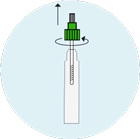
Open Tube
Unscrew the cap of the specimen collection tube.
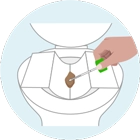
Collect With Tool
Insert the sample collection applicator into the stool sample in at least 3 places. Do not scoop the fecal specimen.
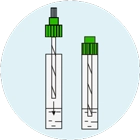
Close Cap And Wait
Screw and tighten the cap on the sample collection tube and shake. Wait for 2 minutes.
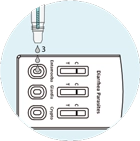
Apply To Cassette
Once 2 minutes have passed, remove the plastic tip on the cap.
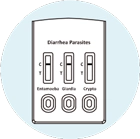
Transfer 3 full drops of the extracted sample to the test cassette.
Wait For Results
Read the results at 10 minutes after dispensing the specimen.
Do not read results after 20 minutes.
Positive Results
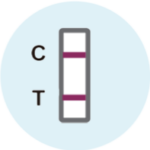
Two colored lines appear. One colored line should be in the control line region (C) and another apparent colored line should be in the test line region (T).
Note: The intensity of the color in the test line region will vary depending on the concentration of Entamoeba histolytica antigens, Giardia lamblia and Cryptosporidium antigens present in the specimen. Therefore, any shade of color in the test line region should be considered positive.
Negative Results
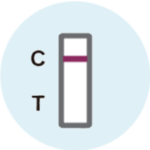
One colored line appears in the control line region (C). No line appears in the test line region (T).
Invalid Results
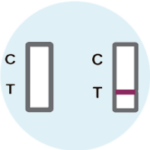
Control line fails to appear. Test did not work.
Insufficient specimen volume or incorrect procedural techniques are the most likely reasons for control line failure. Review the procedure and repeat the test with a new test.
If the problem persists, discontinue using the test kit immediately and contact our support.